80s Fashion Girls Coloring Pages, Vol. 2: A Practical Resource for KDP Publishers and Creators
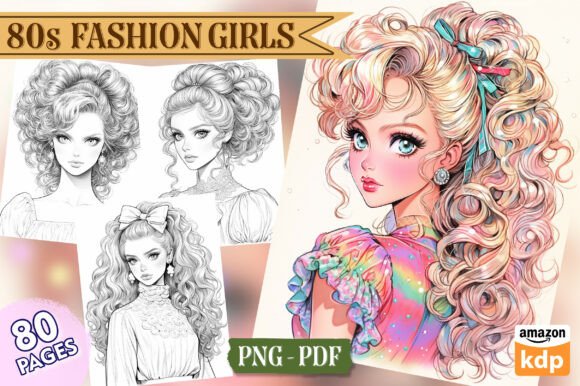
Creating a professional coloring book for the Kindle Direct Publishing (KDP) marketplace requires more than just a collection of images. It demands consistency, resolution standards, thoughtful composition, and a design that appeals to a specific audience. 80s Fashion Girls Coloring Pages, Vol. 2 (also available as 1980s Fashion Girls Coloring Pages for Adults, Vol. 02) is a high-resolution asset pack built specifically for this purpose. It provides 80 individual PNG files at 300 DPI, a print-ready PDF, and 25 book cover options, all formatted to the standard 8.5″ x 11″ inch trim size.
This article walks through what this collection includes, how it fits into a real publishing workflow, and how to integrate it efficiently into your own production process—whether you are a first-time publisher, a small business owner expanding your product line, or a creator looking for reliable, ready-to-use interior assets.
What the Collection Includes and Why It Matters for Production
Before diving into workflow, it helps to understand exactly what you are working with. The core of this pack is 80 individual PNG image files, each at 300 DPI. For print publishing, 300 DPI is the baseline standard. Anything lower risks visible pixelation at the 8.5″ x 11″ page size. Having each page as a separate PNG rather than a bundled multi-page file gives you flexibility—you can rearrange pages, remove or duplicate designs, and mix them with other assets without needing to extract images from a PDF.
The included PDF file is print-ready, meaning you can upload it directly to KDP if you want a quick turnaround. However, many experienced publishers prefer to use the individual PNGs to add border elements, page numbers, or a credits page before generating their own PDF. The 25 book cover options are a significant time-saver. Designing a cover from scratch can take hours, especially if you need to test multiple thumbnail looks. Having 25 pre-made variations means you can select a cover that complements the interior style and move directly to formatting your manuscript.
All files are delivered in a single package, so you are not piecing together assets from multiple sources. This matters for consistency. Every page in 80s Fashion Girls Coloring Pages, Vol. 2 shares a cohesive aesthetic—bold 1980s fashion silhouettes, detailed line work, and a style that appeals to adult colorists who appreciate both nostalgia and intricate design. When you use a single-source collection, you avoid the jarring shifts in line weight or artistic style that can make a coloring book feel disjointed.
Where This Resource Fits in a Publishing Workflow
A typical KDP coloring book project follows a sequence: concept and audience definition, asset sourcing or creation, layout and formatting, cover design, quality review, upload, and launch. 80s Fashion Girls Coloring Pages, Vol. 2 enters the workflow at the asset sourcing stage and carries through to formatting and cover design.
If you are working on multiple titles simultaneously, this pack can serve as the interior for a dedicated 80s fashion book, or you can select a subset of pages to include in a larger themed collection. For example, you might combine 40 pages from this volume with 40 pages from a complementary 1980s pop culture set to create a hybrid book. The key is that the individual file format supports modular assembly. You are not locked into using all 80 pages in one sequence.
For publishers who produce series, having a consistent baseline for page size and resolution simplifies batch processing. Once you set up a template in your layout software—whether it is Affinity Publisher, Adobe InDesign, Canva, or even a scripted tool—you can drop in the PNGs from each volume without resizing or re-exporting. This reduces repetitive work and helps maintain quality across multiple books.
Practical Implementation Tips for a Smooth Process
When you receive the files, start by organizing them in a project folder structure. Create subfolders for the PNGs, the PDF, and the cover options. If you plan to edit or add elements, work from copies of the PNGs rather than the originals. This gives you a clean fallback if you need to regenerate a page.
One common workflow is to open each PNG in your editing software and check that the line art is crisp at the intended print size. Even though the files are 300 DPI, it is worth zooming to 100–200% on a few samples to confirm that details like hair textures, clothing folds, and accessories hold up well. Adult colorists often use fine-tipped markers or colored pencils, so line thickness and clarity directly affect the coloring experience. The pages in this collection are designed with adult colorists in mind, so the line work tends to be detailed but not overcrowded.
If you are adding elements like a copyright page, a table of contents, or a back page with a link to your website, do that in your layout software before generating the final PDF. The 8.5″ x 11″ trim size is standard, so you can use an existing KDP template for margins and bleed. Most layout programs allow you to import all 80 PNGs at once and distribute them across pages. Then you can reorder, delete, or duplicate pages as needed.
The 25 cover options are best reviewed early in the process. Select three to five candidates that align with the interior style and your target audience. Test how each looks as a KDP thumbnail—small, on a mobile screen, next to competing titles. A cover that reads clearly at thumbnail size is more likely to get clicks. Once you choose a cover, you can match the title font and any spine text to the rest of your series branding.
Quality Control and Consistency Checks
Before uploading your final manuscript, run through a quality control checklist. Open the PDF and scroll through every page to confirm that no images are missing, misaligned, or distorted. Check that page numbers (if you added them) are consistent and centered. Verify that the PDF includes bleed if your printer requires it. KDP’s print guidelines specify a minimum of 0.125″ bleed on all sides for books with images that extend to the edge. Since the pages in this collection are designed as full-page interiors, you should include bleed in your export settings.
Another practical step is to print a few sample pages on your home printer. This lets you assess how the line art looks on standard paper and whether the contrast is sufficient. Sometimes fine details that look clear on screen can become muddy when printed at lower resolution. Because the original files are 300 DPI and the line work is professionally rendered, you should see clean results, but it never hurts to verify.
If you are producing a series, keep a style sheet or a simple document that records the file naming convention, the cover options used, and any custom elements you added. This makes it easier to replicate the process for future volumes without rethinking each step.
Long-Term Use and Asset Management
A well-organized asset library saves time across multiple projects. After you finish your first book using 80s Fashion Girls Coloring Pages, Vol. 2, retain the original files in a dedicated archive. You may want to reuse individual pages in a different book—for example, a “Best of 80s Fashion” compilation that draws from several volumes. Because you have the individual PNGs, you can mix and match without reformatting an entire PDF.
The 300 DPI resolution also means these images can be scaled down for promotional use—social media previews, email newsletters, or sample pages on your author website. Just export a JPG version at 72 DPI for web use, and keep the high-res original for print. Having the cover options in the same resolution gives you flexibility for Amazon ads or promotional graphics.
If you collaborate with a designer or virtual assistant, share the PNG folder and a brief style guide. They can then handle layout, cover selection, or quality checks without needing to ask for file conversions or explanations of the format. The simplicity of the file structure—80 PNGs, one PDF, 25 covers—makes delegation straightforward.
Integration with Broader Creative and Business Workflows
Beyond KDP publishing, this collection can serve other practical purposes. Educators teaching fashion history or art classes might use individual pages as handouts. Bloggers writing about 1980s trends could include a sample page as a free download to build their email list. Freelance designers who offer book formatting services can recommend this pack to clients who want a ready-made interior without commissioning custom illustrations. In each case, the high resolution and print-ready format reduce the friction of adapting the files for a new context.
For entrepreneurs running a print-on-demand business, the collection supports multiple product types. You can use the interior pages for a coloring book, but you can also extract a single design, add a border, and sell it as a stand-alone art print. The 300 DPI files handle enlargement well within reason, so a single page could become a wall poster. The cover options also work as standalone images for notebook covers or greeting cards, provided you adjust the dimensions for the intended product.
The consistent aesthetic across all 80 pages is an advantage when building a brand. If you decide to create a series of 80s-themed products—stickers, journals, posters, coloring books—using the same artist’s work creates a recognizable visual identity. Customers who enjoy one product are more likely to trust the quality of another in the same style.
Useful Observations for First-Time Users
If you are new to KDP or to using pre-made interiors, start with one volume before committing to a series. Set up your project, go through the full workflow—from file organization to final upload—and note any steps that took longer than expected. This gives you a baseline for estimating future projects. The 80-page length is a good size for a standard adult coloring book; it is substantial enough to feel like a complete product but not so large that production or shipping costs become prohibitive.
Pay attention to the cover file naming or preview images included in the package. Some packs label covers by theme or color palette, which helps you choose one that matches your intended audience. For example, a cover with neon accents and geometric patterns signals 1980s energy, while a more muted pastel cover might appeal to colorists who prefer softer tones. Align your cover choice with the interior content: if the pages feature bold shoulder pads, big hair, and vibrant patterns, a cover that reflects that energy will set accurate expectations.
Finally, remember that the files you receive are the foundation, not the finished book. Adding your own touches—a brief introduction, a “this book belongs to” page, or a small gallery of finished examples—can differentiate your product from others using the same interior pack. Small additions show buyers that you invested in the presentation, and they increase perceived value.
Moving Forward with Confidence
Whether you publish a single title or build an entire series around the 80s fashion theme, having a reliable, high-resolution asset pack like 80s Fashion Girls Coloring Pages, Vol. 2 streamlines the most time-consuming part of production: sourcing consistent, print-ready art. By understanding how the files fit into your layout process, how to manage them across projects, and how to extend their use beyond a single book, you reduce friction and free up energy for marketing, customer engagement, and planning your next release.
The combination of 80 PNG files at 300 DPI, a print-ready PDF, and 25 cover options gives you a complete starting point. From there, your own workflow decisions—how you order pages, what extras you add, how you brand the cover—determine the final product. With a solid foundation in place, you can focus on execution and consistency, two factors that directly influence customer satisfaction and long-term success in the print-on-demand marketplace.