Rocket Coloring Pages for Kids – Bold Easy Fun
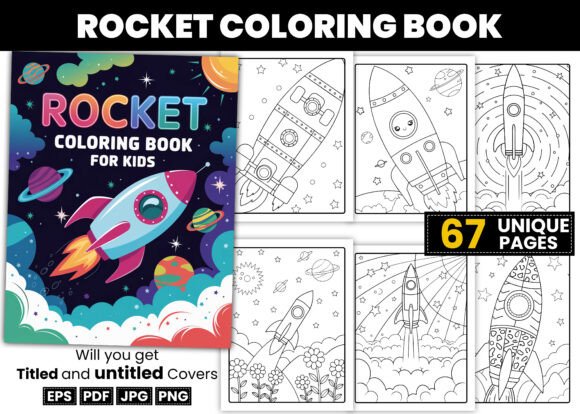
If you have ever tried to put together a children's coloring book, you already know the gap between a good idea and a polished product can be wider than it looks. Rocket Coloring Pages for Kids – Bold Easy Fun aims to close that gap with a bundle of 67 bold, easy-to-color rocket designs, plus 34 book cover images and several production-ready file formats. But before you jump into publishing or printing, it pays to understand what this resource actually delivers, where people commonly stumble, and how to get the most out of it without wasting time or money.
What This Bundle Actually Offers
At its core, this collection is built for simplicity and speed. The coloring pages feature thick lines, uncluttered compositions, and rocket-themed illustrations that appeal to young children. The bundle includes an EPS file with all pages, a 300 DPI PDF interior ready for instant printing, JPG and PNG versions of each page, plus a bonus Belongs-to page and a color testing page. The 34 book cover images come in both titled and untitled versions, giving you flexibility to brand your own book without starting from scratch.
For anyone creating KDP coloring books, this kind of all-in-one package can save hours of design work. But that convenience comes with its own set of pitfalls if you are not careful about what you assume, what you check, and how you use the files.
Mistake #1: Assuming “Bold and Easy” Means the Same Thing for Every Age Group
The phrase “bold and easy” gets thrown around a lot in the coloring book space, but it does not mean the same thing for a three-year-old as it does for a seven-year-old. Some parents and publishers grab a set of pages thinking they work for toddlers, only to find details that are too small or lines that are too thin for little hands. Others assume the pages are too simple for older kids and overlook them entirely.
The rocket pages in this set sit squarely in the preschool to early elementary sweet spot. Lines are thick enough for crayons and markers, and the designs avoid excessive small shapes. If you are targeting toddlers who still put things in their mouths, you will want to check page complexity carefully. If you are aiming at early readers who can handle slightly more detail, these pages will feel just right.
What to do instead: Look at a sample page before committing to a full print run. Compare line thickness and shape density against what your actual audience can manage. A quick test print with a few different age groups will tell you more than any product description can.
Mistake #2: Overlooking File Format Requirements for Your Specific Use Case
The bundle includes EPS, PDF, JPG, and PNG formats. That sounds comprehensive, but not every format works equally well for every purpose. For example, if you plan to sell your coloring book on Amazon KDP, the 300 DPI PDF interior is exactly what you need. But if you want to edit individual pages, rearrange them, or add your own content, the EPS source file is where you should start.
Common oversights happen when people try to edit JPG images directly. JPGs lose quality with each save, and they lack layers. Resizing a JPG page to fit a different trim size can introduce blur or pixelation. Similarly, PNG files with white backgrounds are great for screen previews, but they are not ideal for professional printing if you need to adjust margins or bleed areas.
What to check: Know your output destination before you choose a format. For KDP, stick with the PDF interior and adjust only through the EPS source if changes are needed. For home printing, JPG or PNG work fine. For editing, always use the EPS and export clean versions from there.
Mistake #3: Ignoring the Cover Image Options Until the Last Minute
Thirty-four book cover images sound like plenty, but many users grab the first titled cover that looks okay and move on. That is a missed opportunity. The untitled versions exist for a reason: they allow you to add your own title font, color scheme, and layout. A cover that looks generic will not stand out in Amazon search results, and that directly affects how many people click through to see your interior.
Even if you are not a designer, spending ten minutes choosing a clean untitled cover and adding a bold, readable title in a tool like Canva or Photoshop can transform your book from looking amateur to looking intentional. The titled covers are a nice shortcut, but they lock you into someone else's font and positioning choices.
Better approach: Use the untitled cover images as your base. Pick one that matches the tone of your interior. Add a title in a high-contrast, child-friendly font. Keep the background simple so the rocket imagery stays front and center. That small effort can improve your click-through rate noticeably.
Mistake #4: Forgetting That the Belongs-to Page and Color Testing Page Are Not Optional Extras
These two bonus pages might seem like filler, but they serve real purposes. The Belongs-to page adds a personal touch that parents appreciate, especially if they are giving the book as a gift. The color testing page lets kids try out their crayons or markers before committing to the main designs. This reduces frustration and helps children learn color choice without pressure.
Publishers sometimes skip these pages to save space or printing costs. That is a mistake. Including them makes your book feel more complete and thoughtful. It also gives you an extra page of content without extra design work, since these come ready to use.
Practical advice: Place the Belongs-to page right after the title page. Put the color testing page right before the first rocket design. That flow feels natural and gives kids a warm-up activity before they dive in.
Mistake #5: Expecting One Bundle to Work for Every Possible Use
This bundle is built for KDP interiors and home printing. It is not designed for commercial licensing, app development, or large-scale redistribution. Some buyers assume that purchasing the bundle grants them full commercial rights to use the images however they want. That is not always the case with digital products, and assuming so can lead to legal headaches or account suspension on platforms that enforce strict content policies.
What to verify: Check the license terms that come with your purchase. If you plan to sell printed copies, that is usually fine for KDP. If you want to use the images in a mobile app, a YouTube video, or a physical product line, you may need a separate license. When in doubt, contact the seller before you publish.
Mistake #6: Rushing the Print Setup Process
Even with a 300 DPI PDF interior, you still need to set up bleed, trim, and margins according to your printer's specifications. KDP requires a specific bleed area for paperback interiors. Home printers may shift images slightly depending on the paper size you select. If you do not check these settings, you might end up with rocket tails cut off at the edge of the page or white borders that look unfinished.
Better workflow: Open the PDF in a program that lets you check page size and bleed. Confirm that the interior dimensions match your intended book size. Print one test page on your home printer before uploading to KDP or sending to a print shop. That single step catches alignment issues before they waste an entire print run.
What to Look For Before You Buy
Before you add this bundle to your cart, ask yourself a few practical questions. Are you creating a single book or a series of books? If it is a series, will the cover images and page style stay consistent across volumes? Do you need to edit the pages yourself, or are you happy using them as-is? Do you have the software to open the EPS file if you need to make changes?
The bundle works best for someone who wants a quick, polished interior without reinventing the wheel. If you enjoy customizing every detail, you will appreciate having the source file. If you just want to upload and publish, the PDF interior is your friend.
Also consider the theme. Rocket and space themes are popular with kids, but they are not the only theme kids love. If you are building a whole line of coloring books, this bundle slots nicely alongside animal, dinosaur, or vehicle collections. If you only need one book and the space theme fits your audience, this is a solid choice.
How to Use This Bundle Like a Pro
Start by opening the PDF interior and printing one page at full size. Hand it to a child in your target age range and watch how they color. Do the lines guide them without frustrating them? Do the shapes feel spacious enough? That real-world test is worth more than any review.
Next, open the EPS file and experiment with one small change. Maybe you want to rearrange the page order or add your own page numbers. Learning the source file early saves you from wrestling with it under a deadline later.
Finally, pick your untitled cover image and spend twenty minutes on the title layout. Use a sans-serif font that is heavy enough to read at thumbnail size. Keep the title short. “Rocket Coloring Fun” works better than “My First Rocket Coloring Book for Kids Ages 3-7.” Test how it looks on a simulated Amazon search result page.
What This Bundle Does Not Do
Being clear on limitations prevents disappointment. This bundle does not include lesson plans, activity prompts, or educational text alongside the images. It is purely a coloring page set with covers. If you want a workbook that teaches rocket science facts or handwriting practice alongside coloring, you will need to add that content yourself.
It also does not include a physical book. You receive digital files that you print or upload. That is standard for KDP resources, but some newcomers expect a printed product to arrive in the mail. Know that you are buying the right to produce printed copies, not a finished book itself.
Final Thoughts on Getting It Right
Rocket Coloring Pages for Kids – Bold Easy Fun gives you a strong foundation for a children's coloring book. The 67 pages, the bonus cover images, and the multiple file formats remove most of the technical barriers to publishing. What remains is your judgment about audience fit, your attention to print setup, and your willingness to personalize the cover and interior for your specific market.
The mistakes people make with these bundles usually come from rushing or assuming. Slow down at the file preparation stage. Test your pages on real kids. Use the untitled covers to give your book a unique face. And always check the license terms before expanding your use beyond simple printing and selling.
If you do those things, you will turn this bundle into a product that looks professional, feels intentional, and actually gets used. That is the difference between a coloring book that sits on a shelf and one that ends up covered in crayon marks and held together with tape because a child loved it too much to let go.